Registers Updated Only Before Meetings
Risks are reviewed in the fortnight before the committee meets, so the register reflects a single point in time rather than the current position.
A single risk register, scored consistently across the organisation and kept current throughout the year
Many risk registers are updated only in preparation for a committee meeting. In RiskMan GRC, the register remains live. Your organisation publishes a scoring guideline that sets out its categories and its impact, probability and control scales, and every risk is scored against it. The inherent score is impact multiplied by probability, and the residual score reflects the controls in place. A new risk becomes active only after the Business HOD and the Audit Manager approve it. Thereafter, every addition, change or deletion is processed through a change request, and risk and control owners confirm their risks each period.
The expertise is rarely the problem. The difficulty is that the work is spread across workbooks, email threads and shared folders, and keeping them aligned becomes a task in itself.
Risks are reviewed in the fortnight before the committee meets, so the register reflects a single point in time rather than the current position.
Without a single published scale, a 'high' rating in operations and a 'high' rating in treasury do not carry the same meaning, and heat maps cannot be compared across the organisation.
Ratings are edited directly in the workbook, with no record of who made the change, when it was made or why.
Plans have an owner and a due date, but no follow-up mechanism, so overdue actions surface only when someone enquires.
Publish your risk scoring guideline, build the register, and let the system calculate inherent and residual scores. Risks become active only after approval, every subsequent change is approved before it takes effect, and owners confirm their risks on a schedule you define.
Define your risk categories, impact and probability scales, control scale and residual rating bands, or extract them from an existing Excel, Word or PDF file. Users acknowledge each published version.
Import risks in bulk from the Excel template, with a mapping and validation step, or add them individually. Each risk records its entity, sub-entity, department, category, risk event, owner and associated controls.
The inherent score is impact multiplied by probability. The residual score takes the controls into account, and the rating is derived from the bands in your guideline.
A new risk is routed to the Business HOD and then to the Audit Manager. Either approver can return it with a reason. The risk becomes active only after final approval.
An active risk cannot be edited directly. Any addition, change or deletion raises a change request for approval by the process owner and the Audit Manager, with a before-and-after comparison.
Every control has an owner, a status and key dates. Each mitigation plan has an owner and a due date, and owners upload evidence as work progresses. A completed plan is converted into a control.
On a schedule you choose, whether monthly, quarterly, half-yearly, yearly or on custom dates, risk and control owners confirm their risks or propose changes. The HOD and Audit Manager approve the confirmations, and late confirmations are flagged.
Owners receive reminders before, on and after each due date, with escalation for items that remain open. Pending approvals and guideline acknowledgements are also followed up.
The dashboard presents totals, the heat map, distribution by department and category, top risks, overdue items and owner workload. Export the register to Excel, PDF or CSV, run the standard reports, and review every field change in the audit trail.
Screenshots from the live product.
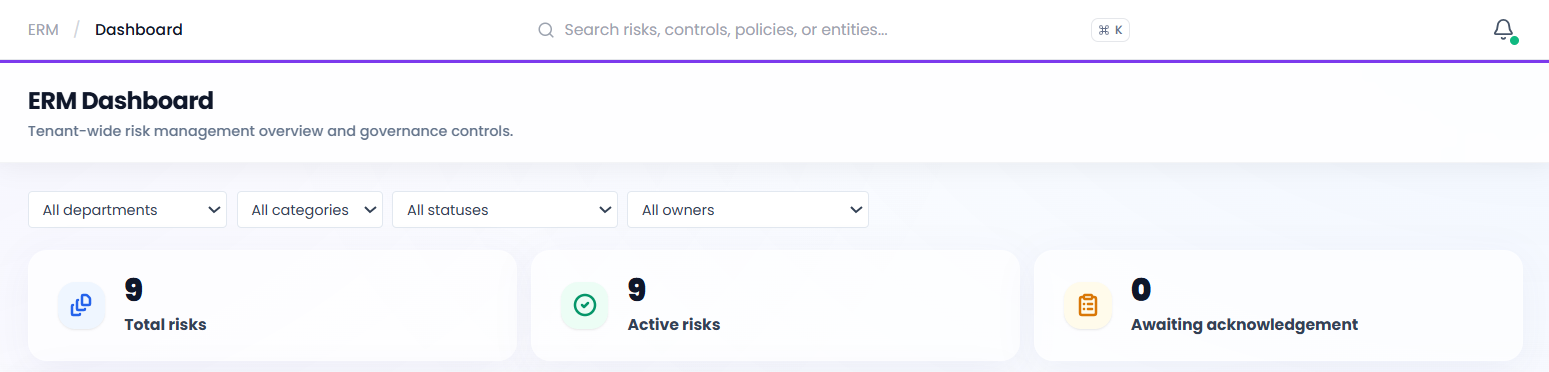
Total risks, active risks and risks awaiting acknowledgement, with filters for department, category, status and owner.
The key steps, in the order your team completes them.
The Audit Manager publishes the categories, scales and rating bands. Users acknowledge each published version.
Import risks from the Excel template or add them individually, each with an entity, department, category, owner and controls.
The inherent score is impact multiplied by probability. The residual score reflects the controls, and the rating is derived from the bands.
Each risk is approved by the Business HOD and then the Audit Manager. It becomes active only after final approval.
Once a risk is active, every addition, change or deletion is raised as a change request and approved before it takes effect.
Owners upload evidence against due dates. Reminders and escalations are issued, and a completed plan is converted into a control.
Risk and control owners confirm or revise their risks on the defined schedule, and the HOD and Audit Manager approve them.
Dashboards, the heat map and reports draw directly from the register, supported by exports and a complete audit trail.
The records the module produces, and the regulations and frameworks they support.
These references describe the context the module is designed to support. They are not a statement of certification, and do not replace professional judgement on your reporting obligations.
Every role works on the same record, and each sees the part for which it is accountable.
If your question is not covered here, please contact us and our team will answer it for your specific requirements.
Yes. The scoring guideline holds your own categories, impact and probability scales, control scale and rating bands. You can enter them manually or extract them from an existing Excel, Word or PDF document.
The inherent score is impact multiplied by probability. The residual score takes the controls into account, and the residual rating is derived from the bands in your published guideline.
An active risk cannot be edited directly. Any addition, change or deletion is raised as a change request, approved by the process owner and the Audit Manager, and applied only after approval. Both the original and revised versions are retained.
At the frequency your organisation defines: monthly, quarterly, half-yearly, yearly or on custom dates. Owners confirm each risk or propose a change, and late confirmations are flagged.
Schedule a one-hour session with our team. We will demonstrateERM using your own processes and controls, so you can assess how a complete cycle would work for your organisation.